|
 |
 |
|
How To Install The NoAdware™ Software FREE Trial And How To Invest In The Full Version To Use All It's Features ...Step By Step! Note:
If you
cannot see some of the
images clearly click on the link below the image that says Click
here to see image
larger
As soon as you install NoAdware™ you'll see a message telling you to update protection (Fig. 1.0). 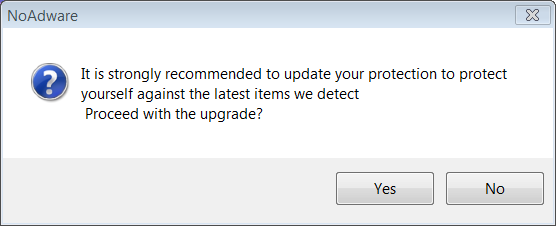 Fig.
1.0 (click
image to zoom-in)
Click Yes. You
can click on
SCAN MY PC from the left side to make a scan. This may take some time.
You can click on SCAN MY PC from the left side to make a scan. Note: If you want help on how to use the software features, when to scan and so on click here. You can see the software has started scanning in (Fig. 1.1). 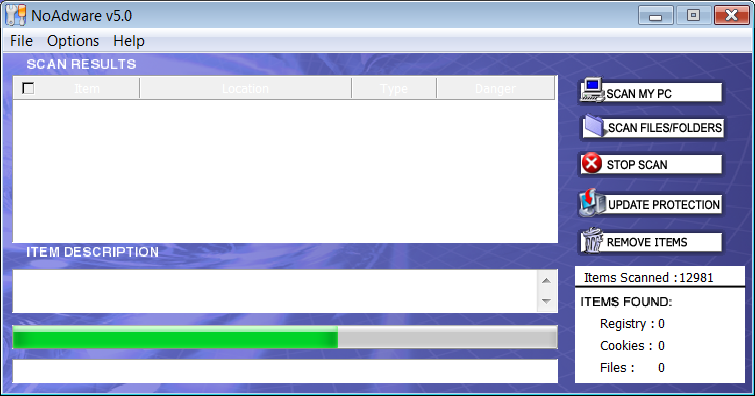 Fig.
1.1
(click
image to zoom-in)
How To Invest In The Full Version With
the FREE
trial, you will only be able to find spyware and all other dangerous
"objects", but unable to remove
them. Real time protection feature is ON, but again you cannot remove
any adware, spyware, etc that the software blocks or finds on your
computer.
You
need a registration
key and you get it by investing in NoAdware™ software. 1) Open NoAdware™ Software. 2) Click on Register from the Top Menu and Click on Purchase Now.
4) You be
taken to NoAdware™ secure
website where you can easily order. There you will also be able to
chat live with our support team if you need help, or
have any questions. You can cancel subscription anytime but you won't get any support if you need if you cancel. Your order is backed up by a 60 Day Money Back Guarantee. All credit cards are accepted including Visa, MasterCard, American Express, Discover,Eurocard, Bravo, Diners Club, Carte Blanche, JCB or Paypal. You
will see a
registration number automatically after you place your order. The
entire
process of registration should take
5 minutes or less. You only
need the
registration number and the email address you used when you ordered.
The registration number is in this format: 12345
- 67890 -
12345
Note: If you ever lost it or forget it you can quickly contact us and we give your own registration number. (Tell us your name and email please). 1) Open NoAdware™ Software.  (click image to zoom-in) The
following screen pops up again (Fig. 1.2).
In second box enter your Registration Number. Then click Register. That's it. You can either type the registration number manually in the three boxes, or copy and paste each part. The
number is in this format (3 parts):
12345
- 67890 -
12345
To
copy and
paste: Select
the
first part of the
registration key (make sure the dash is not
included) Right-click on
your selection and choose "Copy" from the menu. Then right
click
on the first box, and choose "Paste" from
the menu. Do the same for the second and third parts. Be careful not to copy the dashes. Now please click
here >>
for step by step instructions with screenshots on how
to scan your computer with NoAdware™, use the options,
download updates - the complete tutorial.  Karl Smith NoAdware TeamSM Spyware Specialists |
What People Are Saying About NoAdware™
|